 Commy
Files and drives
Files in Commy go straight from the person who has them to the person who opens them. There is no upload to a company's storage, so there is nothing to pay for and nobody else holds a copy, unless a server's owner adds their own Cloudflare Storage as a backup.
Send a file
Choose Upload a File from the plus button in the message box, or paste or drop a file into the conversation. Pictures show in the chat, videos play in place, and other files get a Download button.
| App | Largest file |
|---|---|
| Desktop | 4 GB when you pick it with Upload a File, 512 MB when you paste or drop it |
| Phone and tablet | 512 MB |
| Browser | 100 MB |
On the desktop, a big file is not copied into Commy. The app reads it where it sits on your disk and shares it from there. Opening a big file asks where to save it first, then fills it in piece by piece while the Download button shows how far it has got.
A server can set a smaller limit for its channels and drives, see Moderation.
Who can open it, and for how long
A file can be opened while someone who has it is online, and Commy makes sure more than the sender has it:
- The sender. The desktop app keeps every file you send ready to share for 30 days. A file you picked stays where it is and Commy only remembers where it was, while pastes and voice messages are kept as a copy. After 30 days Commy stops sharing it and never touches your original.
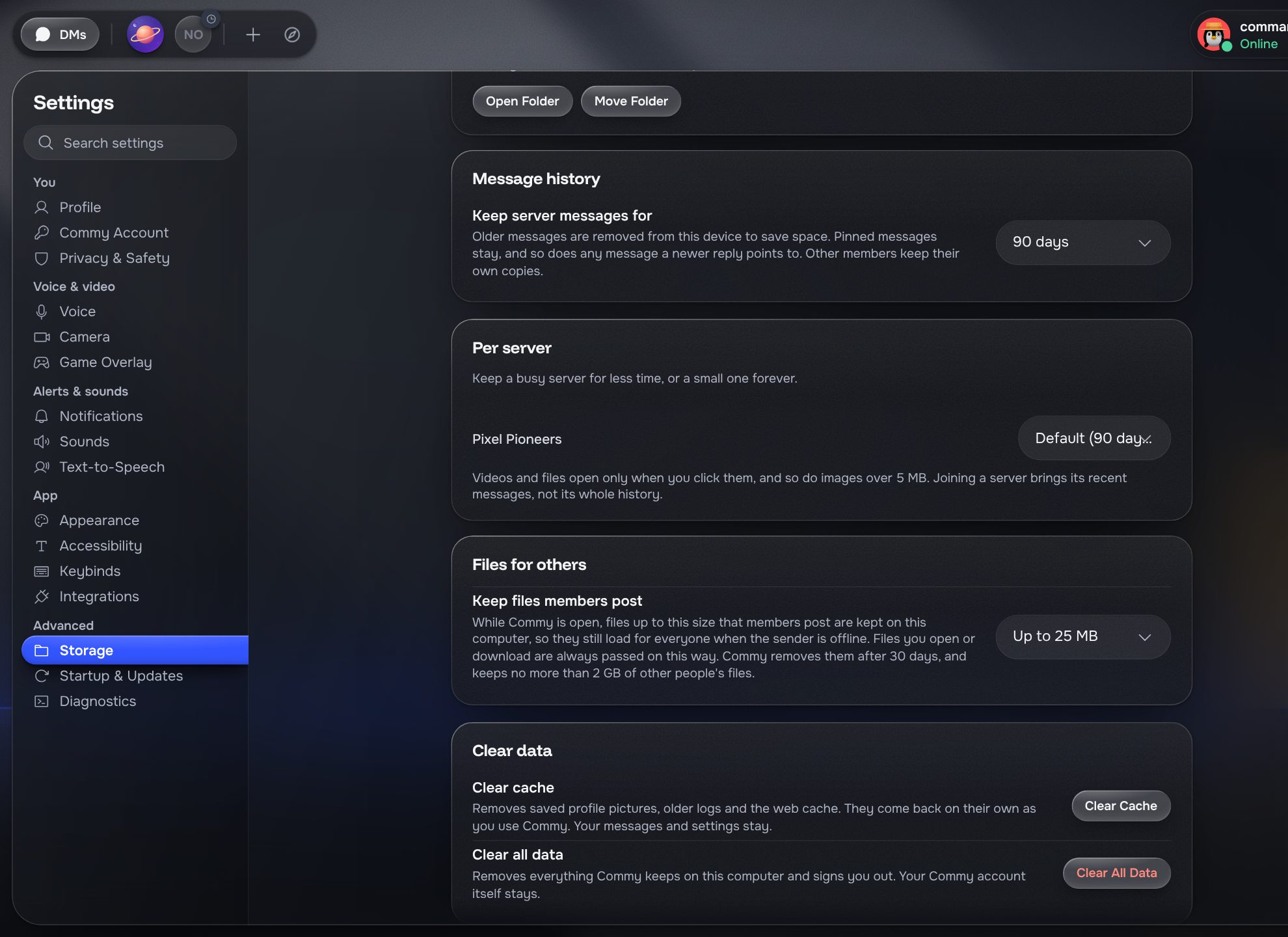
- Members who are online. While the desktop app is open, it keeps a copy of each file up to 25 MB that members post in your servers, so the file still loads for everyone when the sender goes offline. Change the size, or turn it off, in Settings, Storage, Keep files members post: Off, up to 10 MB, 25 MB or 100 MB. Commy keeps no more than 2 GB of other people's files.
- Anyone who opened it. A file you open or download on the desktop is passed on to other members too, whatever its size, so a file shared in a busy server stays easy to get.
- Phones and tablets. The phone app keeps the files you send, open or download in a cache of up to 500 MB and passes them on to members while Commy is open. The oldest go first when it fills up.
Every copy kept for others is removed after 30 days. Drive files are the exception, see below.
Small server? Add a backup
In a small server everyone who has a picture can be offline at once, and it will not load until one of them is back. If your members keep seeing files that wait for someone to come online, the owner can connect Cloudflare Storage in Server Settings. Members' apps then also keep an encrypted copy of each file up to 30 MB in a bucket on the owner's own Cloudflare account, so files load any time. For most small servers it costs nothing, and it takes about ten minutes to set up.
When you open a file, Commy asks every member's devices that might have it, not only the ones you are connected to right now. If nobody who has it is online, the file says whose app it is waiting for and keeps trying for a few minutes. In a server with Cloudflare Storage, Commy looks there first.
If you sent a file from the desktop and Commy no longer has it, it looks for the same file in your Downloads, Videos, Pictures, Desktop and Documents folders and checks it is exactly the one you sent. If it is not there, the picture or video says so and offers Choose File, which only accepts that exact file.
Settings, Storage, Space Used shows how much room shared files take on your computer, the ones you sent and the ones you keep for others.
Drive channels
A drive channel is a shared folder for a server: game mods, replays, maps, rules or anything else people want to keep in one place. Drives are new and marked Beta.
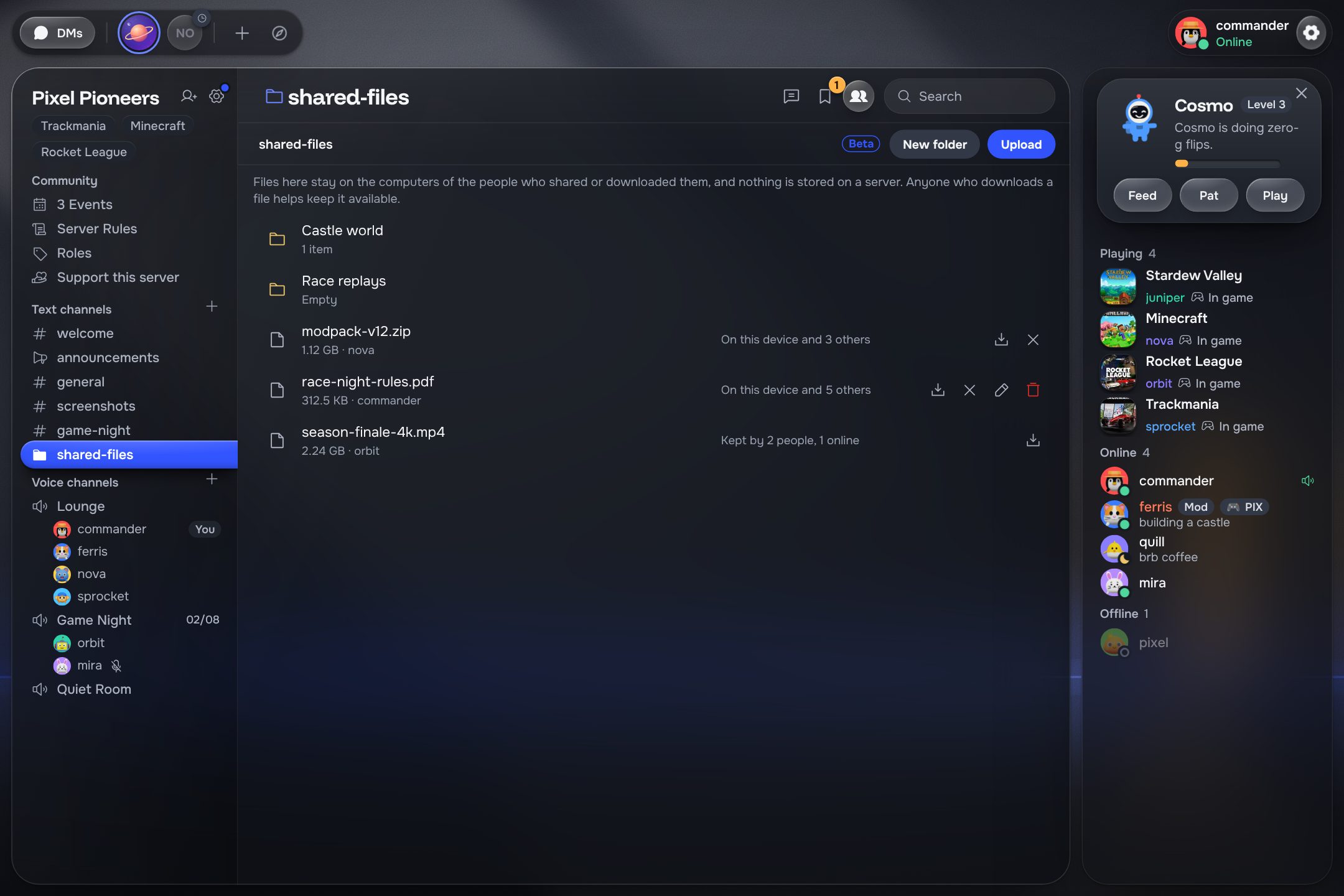
Create one with the Drive type when you add a channel, see Servers and channels. Inside it:
- Upload adds files and New folder adds a folder. Folders can sit inside folders.
- Each file shows who added it, how many people keep it and how many of them are online.
- Download saves a file to your computer. From then on you help keep it available for everyone else.
- Stop keeping this file stops your computer sharing it, without deleting your own copy.
- Whoever added a file or folder can rename it, move it or remove it, and so can moderators.
Files in a drive stay on the computers of the people who shared or downloaded them, and nothing is stored on a server, so a file is there while one of its keepers is online.
Where it works
- Desktop: everything on this page.
- Phone and tablet: files up to 512 MB in channels and direct messages, and the 500 MB cache that passes on what you send, open or download. Drive channels are a desktop feature.
- Browser: files up to 100 MB in channels and direct messages. A file you send from the browser is shared from your tab while it stays open, and after that from members who kept a copy. Drive channels are a desktop feature.