 Commy
Keep files loading with Cloudflare Storage
Running a small server? Set this up. It is the best backup for pictures, videos, files and voice messages, and for most small servers it costs nothing.
Text messages reach everyone through Commy's encrypted sync, even when nobody else is online. Pictures, videos, files and voice messages are different: they come from the devices of members who have them. In a big server someone who has a file is almost always around. In a small server everyone can be offline at once, and then a picture just says whose app it is waiting for until one of them is back.
Cloudflare Storage fixes that. The server owner connects a storage bucket on their own Cloudflare account, and members' apps keep an encrypted copy of each file there as well. From then on, files load any time, whoever is online.
Do you need it?
Set it up if any of these sound like your server:
- Members see pictures, videos or voice messages that say they are waiting for someone to come online.
- You have fewer than about ten members, or people play at different times of day.
- Nobody leaves the desktop app open all day.
Big, busy servers usually do not need it, because the more members are online, the more of them can pass files on. It still works there if you want it.
Before you start
- You need to be the server owner, or have a role with Manage Cloudflare Storage. Only those people see the Cloudflare Storage page in Server Settings.
- You need a Cloudflare account. A free one is fine. Cloudflare may ask for a payment method before it turns storage on, even when you stay inside the free allowance.
Set it up
- Sign in to the Cloudflare dashboard and open R2 Object Storage. Turn R2 on if it is not on yet.
- Open the Deploy to Cloudflare link. It creates a storage bucket and a small worker, both named
commy-files, on your account. When it asks forSETUP_CODE, make up a code of at least 16 letters, digits or dashes, and keep it to yourself. - In the dashboard, open the
commy-filesbucket, then Settings, Object lifecycle rules. Add a rule for the prefixf/that deletes objects 90 days after upload, so storage stays small. Older files keep loading from members' devices. Leave anything starting with_commy/oru/alone, because those hold the member list and each member's daily upload count. - Open the worker in the dashboard and copy its address. It ends in
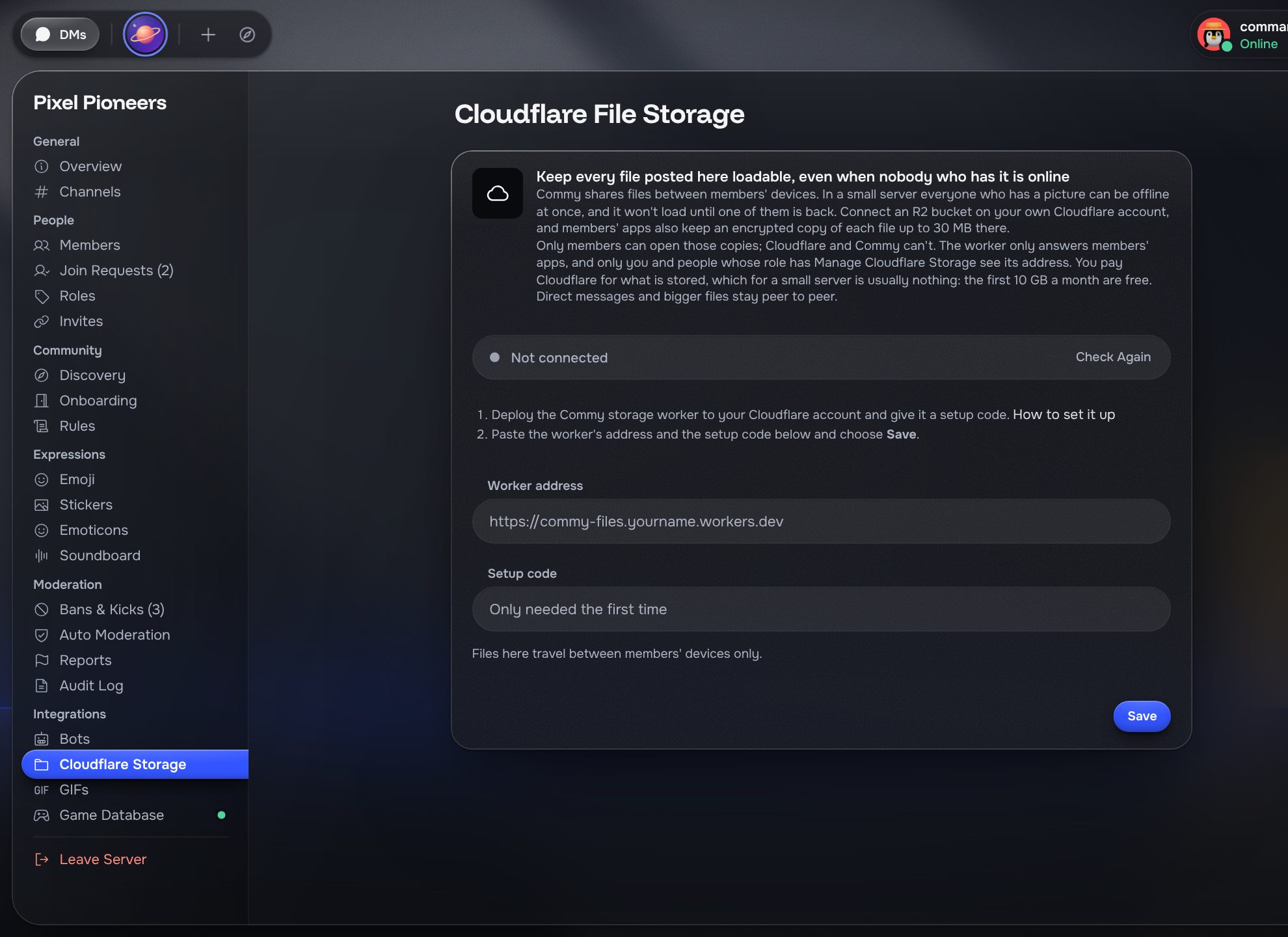
workers.dev. - In Commy, open Server Settings, Cloudflare Storage under Integrations. Paste the address into Worker address, paste your code into Setup code, and choose Save.
Commy checks that the address answers and hands the worker your server's member list. The status line then says Connected and working. Check Again runs the check whenever you like. If it says the worker has not been set up for this server, enter the setup code and save again.
How to set it up on the settings page opens the same steps, along with a way to deploy from the command line.
What happens next
- Pictures, videos, files and voice messages up to 30 MB posted in the server's channels are also kept in your bucket, and members' apps load them from there first.
- A file posted before you connected storage is copied in the next time someone opens it.
- Direct messages and files over 30 MB stay peer to peer, the same as before.
- To go back to peer to peer only, open the page again and choose Remove. Nothing already posted breaks.
Who can see what
- Nobody else can open the files. Members' apps seal every file before it leaves the device, with a key that only appears inside the server's encrypted messages. Your bucket holds sealed copies with random names, so neither Cloudflare, your Cloudflare account nor Commy can open them or tell what they are.
- Only members can use it. Every upload and every read is signed by a member's Commy identity, and the worker only answers members on its list. When someone joins, leaves or is banned, the owner's app, or the app of someone with Manage Cloudflare Storage, updates the list within a couple of minutes while it is open. Until then, a new member loads files from other members as usual.
- Only managers see the address. The owner and people whose role has Manage Cloudflare Storage see and change the address. Everyone else's app uses it without showing it.
- Keep the setup code private. It is only needed the first time, or to connect the worker to another server or a new owner. Anyone who has it can take the worker over, so change
SETUP_CODEin the worker's Settings, Variables and Secrets if it gets out.
What it costs
You pay Cloudflare for what your server stores, and nobody else does. For a small server that is usually nothing:
- The first 10 GB stored each month are free, and after that it is US$0.015 per GB a month.
- Downloads are free.
- Uploads and reads stay inside Cloudflare's free monthly allowance for almost every server.
Each member can upload up to 500 MB a day. To change that, set DAILY_UPLOAD_MB in the worker's Settings, Variables and Secrets. Keep an eye on the bucket's size in the dashboard, and turn on a billing notification in Cloudflare if you want a warning. The worker never deletes or replaces a file it has kept. See Cloudflare's R2 pricing for the current numbers.
Where it works
- Desktop and phone and tablet: set it up, and load and keep files through it.
- Browser: set it up, and load and keep files through it when the address ends in
workers.dev. If you put the worker on a domain of your own, the desktop and phone apps use it and the browser loads those files from members instead.